Showing posts with label Technology. Show all posts

Tuesday, February 14, 2012

Technology Tuesday: Spotify

I will NEVER have to buy another album (yes, I'm that old) again.  Not another CD and likely not even another MP3.  Jimbo doesn't feel the same so our collection will continue to grow, but I have all the music I'll ever need through Spotify. The best way I can to describe it is that iTunesPandora and Yahoo Music had a baby and its PRETTY.  


I've always been more of a radio listener than a tape/CD/mp3 listener and I think the main reason is that I enjoy the variety.  If I did listen to cds I would tend towards soundtracks or greatest hits to better ensure that I got a good mix of good songs.  Then a few years ago, thanks to some of my younger friends at ASB, I discovered Pandora and it was/is great.  I love the variety and not having to make a decision/remember what album my favorite songs are on.  Or for that matter the name of them.  I've never understood how Jimbo can just walk up to our HTPC and rifle through the nearly 1500 albums we have on the server and just instantly decide what to listen to. It honestly amazes me! Pandora was perfect, just tell it what you like and it plays other stuff like it.  Genius!  The only downside is that if someone asks you "have you heard that great new Adele" song?  You can't just go punch up the name of the song on Pandora and have it play THAT song.  You might get another Adele song but not THE song you're looking for.  This is where my conversion to Spotify began.


What makes it so cool?  Here's the [not so] short list of the things I love:
  • What I want, when I want -  Spotify describes themselves as a new way to listen to music. Millions of tracks, any time you like. Just search for it in Spotify, then play it. Just help yourself to whatever you want, whenever you want it. There are so many things that I love about it, but their motto "all the music, all the time" sums up the main reason pretty well.  You can literally listen to [almost anything], anytime you want, on multiple devices. The average, radio-listening music lover will be able to hear anything they want.  Folks like Jimbo who have eclectic tastes may have a bit more trouble, but even he has been able to discover some new music that he likes.  
  • Artist Radio - very much like Pandora you can pick an artist and Spotify will play tracks by other artists with similar styles.
  • Your work is transferable - One of the things I never liked about iTunes is that you did all the work to get your play lists organized, but when you opened iTunes on another computer they weren't there.  Maybe I was doing something wrong and maybe this is different now with iCloud.  Regardless, you can definitely take your work with you with Spotify.
  • Shared Playlists - You can both statically share a playlist that you've created with friends (or the world for that matter) but even cooler is your ability to create "collaborative" playlists so that multiple people can contribute.  We have a list at work where we can add "motivational" songs.
  • Organize your personal stash - You can use Spotify to import your local music files, create playlists from them, sync them to you mobile device...basically everything you can do from iTunes to keep them organized.
  • Mobilize your music - Not only can you use Spotify's mobile apps to stream content on your Apple and Android devices, you can listen to your local music.  To take it one step further, you can even make playlists available "offline" so that when you're not connected to wifi you can still listen to your tunes.  Love this!
And a couple of new things I haven't played with too much:
  • Shazam integration - Shazam is on of my favorite apps.  I never know who is singing a song, much less the name of the song.  So now not only can I use Shazam to find out the name and artist of a song, I can add it to Spotify instantly.  Love it!
  • Apps - We'll see where this goes, there are only a handful now and most are jsut different ways to discover new music or grab some public playlists, which is always good.  I do liek the "top 10" and "Billboard" apps, I bet Jimbo would like the SongKick Concerts app since he likes going to live music.  Let me know if you find some cool ones.
Have you guys tried spotify?  You can try premium for free for 30 days, but even the free version is awesome.  What do you think of it?  I'd love for you to share your favorite playlist with me and in honor of Valentine's Day, here is one that that made me smile. 

Tuesday, February 7, 2012

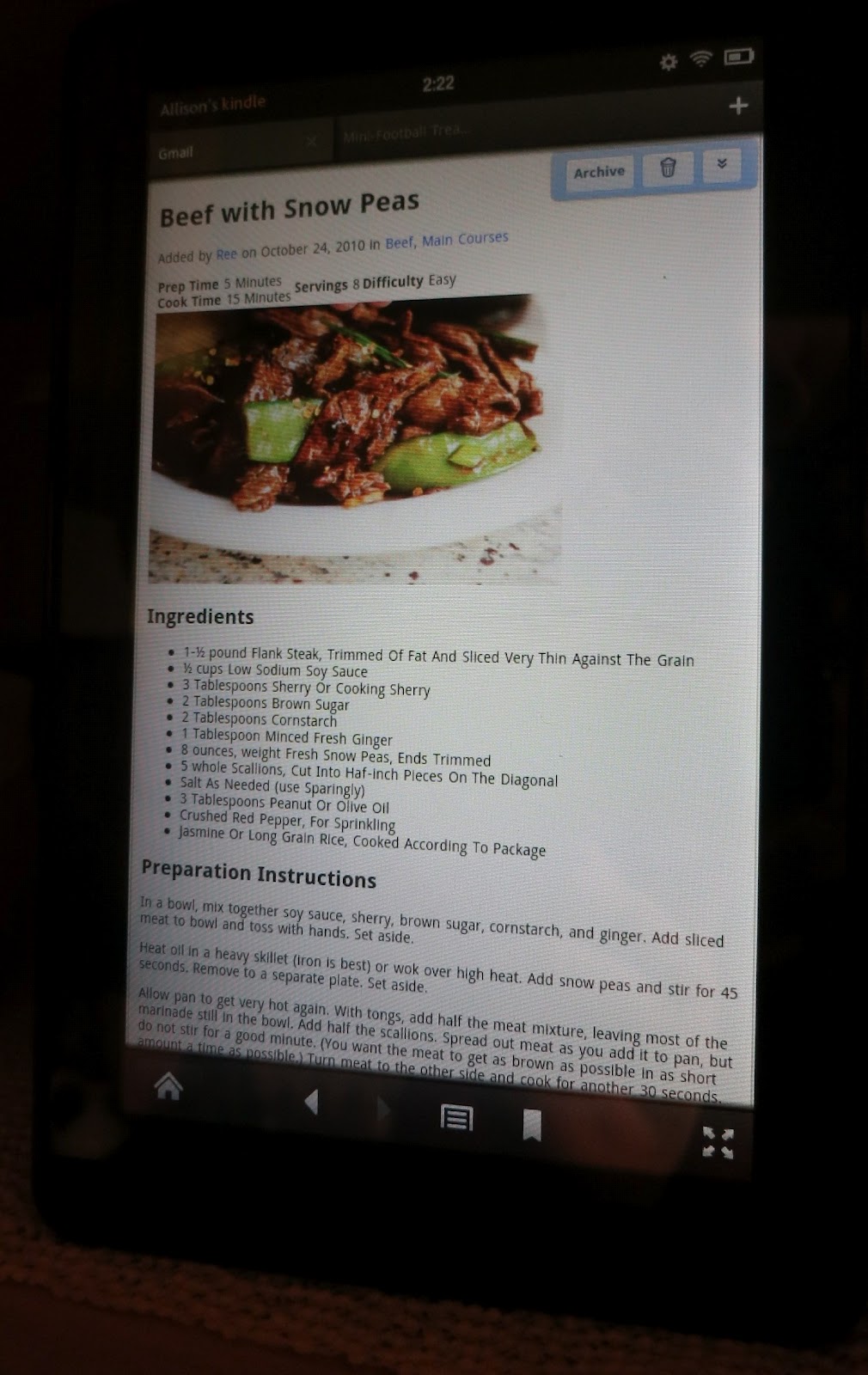
Technology Tuesday: Organizing your recipes with Gmail


Week 4 of  Home Storage Solutions 101's 52 week Organized home Challenge is Cookbooks and recipes.  This is a perfect segue into me showing you just how big a geek I am.  


My recipe Gmail hard at work at
dinner last night.  Yeah Kindle Fire!
Have you ever been at the store and come across a super bargain on something and then not be able to remember everything else in the recipe that you were thinking about making with it?  Do you have a smartphone or tablet that can access your email account whileyou're at the grocery store? If so, you are well on your way to chucking all those loose, sauce covered, sticky recipe cards that we all know and love, but can barely read for all the stains.


But, isn't it a ton of work to convert all of my recipes?  Well, yes but your up front work will pay off in the long run.  The time you spend typing them up will save you time rifling through them in the future as well as having to rewrite them the next time you spill something on them.  Also, where do you get your recipes from?  If you, like me, get a lot from your favorite magazines, you either have piles of pages ripped out of magazines or you have to spend time writing them up.  You see where I'm going?  Plus, when is the last time you carried your recipe box with you to the grocery store.  I wasn't kidding about the bargains, but also, if you just see something in teh grocery store that sparks a craving you can just look up the recipe on your phone lickety-split!


To give credit where credit is due, this is not my original idea.  It was born from this article http://lifehacker.com/197975/store-your-recipes-in-gmail but I did make it my own in several ways.


Unlike the article, I don't use my main email, i created a completely separate email account.  I did this for 2 main reasons 1) I was HOPING that some of my friends and family would contribute their favorite recipes to the "book" and then log in to use the account as well so i wouldn't want them nosing around in my regular email.  Props go out to Betsy who may be the only one (B, I had to change the password recently so let me know if you want the new one) and 2) This allowed me to create a ton of different labels without getting them mixed up with my regular email.


Where do you get your recipes from? 
  • Friends: Just ask them to email you the recipe either to your main address or directly to your recipe address.  I tend to ahve them send it to my regular email both because they already have that email AND because I like to clean up the email before forwarding onto my recipe email.  Generally I have the recipe title in the subject line, the repeat the recipe title in the main body followed by the ingredients and instructions.  
  • Magazines: As much as I love technology, I still love flipping through magazines.  When I come across a recipe in magazine I rip it out and put it in my recipe file to type up later (I used last week's recipe challenge to get caught up on my backlog).  9 times out of ten all I have to do is go to the website of the magazine and search for the recipe and then you can copy and paste the recipe into an email (I usually send the recipes from my main account to HazelsRecipes because I'm usually logged into my main email)
  • Parties:  Don't you hate it when you're out at an event and fall in love with a dish and either don't know the person well enough to feel like you can ask them to send you the email.  OR you do know them but know they will never remember to send it to you!  I've found that a great trick is to just ask them what's in it and then come home to a site like  allrecipes or food.com that allow you to do ingredient searches.


Labels
Once you get a few recipes into your new recipe email account, the next step is to label them.  For those of you who don't use Gmail, think of a label as a "folder" or "tag" that helps you organize your emails. In the Lifehacker article, it appears that they are suggesting just one label called "recipes" within your regular email account.  The downside of this is that it would create a single, very long list of emails.  I needed a bit more categorization.  I suggest creating labels that mirror the categories in your recipe box.  You can even create "sublabels" for those recipe categories that you have a lot of and/or want to be able to browse very specific categories.  This way, the next time you need a recipe from a specific category, say a yummy appetizer for a SuperBowl party or a decadent dessert for Valentine's Day, you can just click on the label and browse all your recipes.  


In addition to my main category labels I created a few extras to let folks know which were my favorites.  Again, my original intent was to use this as a shared recipe database and seeing as how there are recipes in there I will probably never get around to making, I thought it a good idea to give some recommendations to folks who logged in.  One of the things that I like about Gmail is that you can put as many labels on an email as you like.  The sky is the limit on how granular you can be in your organization!


Other tips and tricks:
1) Gmail's new inboxes make it easy to manage your tagging.  I don't always go in an label all the recipes right away, so by using the "unread first" you can label all of your unread messages and then "mark them as read" to get them off the top of the list.


2) Want to protect your main email account from spam, but still want to get in on all the neat recipe email lists out there?  (I love newsletters from Taste of Home and SparkPeople!) Use your recipe email to subscribe to these sites!  You can then use Gmail's Priority Inbox (see tip 1) to separate these from your recipes by marking them as not important.
3) When copying a recipe from a website use the "print" function on the page to bring up a "cleaner" version of the recipe before copying.  If you try to copy and paste from the main page you will end up copying a lot of extra ads and other html that will gunk up your email when you paste it.


So what do you think?  Are you ready to take the Gmail recipe plunge?  If you want to peruse my recipes, I'm happy to let you for the low, low price your favorite recipes!  I accept email, Word Docs, text files, Pinterest and Evernote!  If you don't know that the last two are, stay tuned for future editions of Technology Tuesday.


Tuesday, December 27, 2011

Technology Tuesday

Anyone who knows me knows that I'm a geek. Not a hardcore geek like the hubs but I sure like my gadgets and if there's a way to avoid paper I'm all for it! I'm proud to say that after just over 5 years at my job I don't have a single paper file other than my HR paperwork! Technology has changed our world in so many ways, not all of them for the better, but I want to start sharing the things that I've found that I love. The technology that makes my life better, more efficient, more fun or things that I think are just plain cool!
I'll start of today with my love for almost all things Google. I'll cover many of them specifically in coming weeks but today it's just Google itself. I wish I was smart or cool enough to get a job there but since I'm not I'll just have to lust after its perks and ogle its doodles.  One of the main reasons that I'm starting off with them is because I found these really cool search stories that they did that show the ways that the Google search engine has been used to accomplish some pretty amazing things.  I like so many of them, but I think this is my favorite:


or maybe this one:


It would be so amazing to discover a star!!!

 I use Google search everyday but its really neat to see how its changed people's lives.  Which video is your favorite?